
1xBet Ghana Login — how to sign in to your account
Your 1xBet account is where your balance, open bets and bonuses live, and getting back to them takes well under a minute. The same login works across the desktop site, the Android APK and the iOS app from the Ghana App Store, so whichever you reach for, everything stays in sync. If you haven’t created an account yet, you’ll need to register first, since the login form only opens existing accounts, not new ones. If you already have one, head to the method below that matches how you signed up, by phone, email or your user ID.
Ways to log into 1xBet Ghana profile
You sign in the same two ways you registered, by phone or by email, and you can also use the user ID generated at signup if you saved it. All three go through the same form; you just pick which one to enter. Sign-in works the same on mobile Safari, Chrome on a laptop or inside the app. Each session ties to one account per device type, so signing in on a new phone ends the previous app session.
Whatever identifier you set at signup (phone, email or user ID) becomes your login credential. The password you chose stays with the account until you change it under Account Settings.
| Sign-in method | What you enter | Use it when |
|---|---|---|
| Phone | Your Ghana number (+233) and password | You registered by phone (most common) |
| Your email and password | You registered by email | |
| User ID | The numeric ID from your registration email and password | You saved the ID 1xBet generated at signup |
1xBet login with phone number
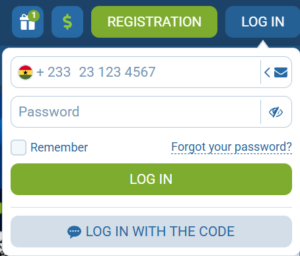
Signing in by phone is the most common choice among Ghanaian bettors. The number you used at signup also handles password recovery, so there’s only one credential to remember:
- Open 1xbet.com.gh or launch the app
- Tap the Log In button in the top-right corner
- Pick the Phone tab on the sign-in form (marked with a phone icon)
- Enter your Ghanaian number with country code (+233) and your password
- Tap Log In
If two-factor authentication is on, an SMS with a verification code arrives on your phone. Enter the code to complete sign-in and unlock full bet management, cashier, and bonus tracking.
If the password field keeps rejecting you, check caps lock first and confirm the country code isn’t duplicated (+233 233…). These are the two most common sign-in slip-ups on mobile keyboards.
1xBet login by email
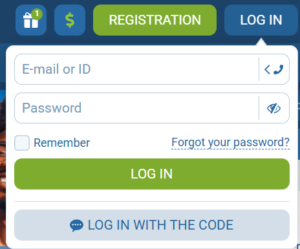
Signing in by email works for anyone who registered with an email or who saved the user ID from their registration email. On the login form, pick the Email tab and enter either one. Add your password and tap Log In.
Both email and user ID credentials point to the same account, so pick whichever is easier to remember when signing in. Phone-number and email logins access the same profile — creating multiple accounts under one name breaks the terms and triggers a block, so stick with whatever method you used at signup.
For daily convenience, turn on Remember Me under the sign-in form so the browser stores your session between visits. For larger balances, enable two-factor authentication in Account → Security.
1xBet login through the mobile app
The app keeps your session active by default, so it remembers you across restarts, low-signal zones and airplane mode, with no retyping each time. It also adds two things the browser doesn’t: biometric unlock (fingerprint on Android, Face ID or Touch ID on iOS) and push notifications for goal alerts, odds shifts and bonus drops. The layout is the same on Android and iOS, so switching devices doesn’t mean relearning the interface.
Login on Android (APK)
To log in on Android, you need the APK installed on your phone first. Since Google blocks betting apps on Play, you download the APK directly from 1xbet.com.gh. Once installed, 1xBet Ghana app login runs through four steps:
- Tap the app icon on your home screen
- On the main app screen, tap the profile icon in the top-right corner
- Choose Phone, Email, or User ID on the sign-in form
- Enter your credentials and tap Log In
After the first successful sign-in on Android, turn on Fingerprint Login in Account → Security so future sessions unlock with one touch. The app also supports Remember Me for automatic session continuation between app restarts.
If you registered in the Android app first, the same credentials work on the website; it’s one account either way.
Login on iPhone and iPad
The iOS app is available in the Ghana App Store as “1xBet: Sports Betting Ghana” from Clickwell Ghana Limited — no region switching needed. After installing, 1xBet app login on iPhone or iPad works in four steps:
- Open the app on your home screen
- Tap the profile icon or the Log In prompt on the welcome screen
- Select Phone, Email, or User ID
- Enter credentials and confirm with Face ID, Touch ID, or your Apple ID password
The iOS app works with iPhone Keychain, so after your first sign-in iOS offers to save the password, and later logins just need Face ID or Touch ID.
If you swap between iPhone, iPad, and the web, all three surfaces sync to the same account. Open bets and bonuses don’t split across devices.
1xBet login problems and how to fix them
Most 1xBet login issues fall into four categories: wrong credentials, account temporarily locked after too many failed attempts, site maintenance, or stale browser cache. Most clear within a minute — the fixes below cover what to do in each case. The one thing to avoid: don’t create a second account to bypass a login issue. Duplicate accounts get caught within days and both copies are blocked, which wipes bonuses and any pending withdrawal.
If the regular 1xBet login link isn’t loading at all, clear the browser cache or try from the app instead.
How to reset your password
Forgotten passwords are the most common reason sign-in fails. Reset takes about 60 seconds:
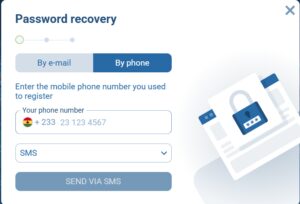
- Tap the Forgot your password? link below the password field on the sign-in form
- Pick recovery by phone number or email — whichever you used at registration
- Enter the account’s phone or email; a 6-digit code arrives by SMS or in your inbox
- Enter the code, set a new password (at least 8 characters, mix of letters, numbers, and a symbol), confirm
After resetting your password, log in again on every device you use; the old one stops working immediately across sessions. If the reset SMS doesn’t arrive within 60 seconds, double-check the country code in your account settings and request another code. If email doesn’t arrive, look in spam and promotional folders; the sender is typically [email protected].
If that reset link doesn’t redirect anywhere, clear your browser’s cache and cookies, then try again in a private window.
What to do if your account is locked
Accounts get locked for three main reasons: multiple failed sign-in attempts (typically five in a short window), suspicious payment patterns, or missing KYC verification before a withdrawal. The fix depends on the cause:
- Check your email for the lock notification — it usually explains the reason
- Gather clear photos of your Ghana Card or passport plus a recent utility bill for address proof
- Contact support through one of: live chat on the site, WhatsApp, email at [email protected], or the in-app help section
Support runs 24/7 with response times around 15–30 minutes on chat and WhatsApp, longer on email. When you write, give your user ID and the exact error message. Most locks reopen within 24 hours once you’ve confirmed your identity.
1xBet welcome bonus for new Ghana players
If you signed in for the first time after registering, a welcome bonus may be waiting: up to 100 USD for sports, or a package of up to 25,500 GHS plus 150 free spins for casino, on a qualifying first deposit. Full terms and eligibility are on our 1xBet Ghana bonus page. Your bonus progress shows in Account → My Bonuses once you’re signed in. 1xBet operates in Ghana under Gaming Commission of Ghana licences (Sports Betting № GCSB25H4885G, Casino № GCCA25E0038Z) alongside a Curaçao international licence (No. 1668/JAZ). 18+ only. Set deposit or session limits in Account → Responsible Gaming if gambling is becoming a problem.
Login 1xBet in Ghana starts at 1xbet.com.gh or the app — tap Log In, pick your registration method (phone, email, user ID, or social), enter credentials, and tap the sign-in button. If you haven’t registered yet, start at the Registration button instead; the sign-in form doesn’t create accounts.
You need the identifier you set at signup — phone number (with +233), email address, or the numeric user ID from your registration email — plus your password. If 2FA is on, also have access to the SMS channel linked to your account.
Yes. You can sign in to your account on phone, tablet, and desktop simultaneously, with balance and bet history syncing in real time. The only catch is that mobile app sessions automatically disconnect previous app sessions when you sign in on a new device — your desktop browser session stays active separately.
Tap Forgot your password? below the password field, choose phone or email recovery depending on what you registered with, enter the code you receive, and set a new password. The process takes about a minute, and your balance stays intact.
Yes. Go to Account → Personal Details to add a phone number if you registered by email, or link an email if you registered by phone. All added identifiers become valid credentials for the same account.